
Nobody has studied what Meta’s display glasses do to your eyes or your attention over months of daily wear, because the product has only been on sale since September 2025. What we can say comes from two older bodies of research. The vision science on near-eye displays says single-lens, see-through screens create a specific kind of visual conflict, and that near-eye displays in general can cause visual fatigue; how much that applies to a small, off-centre display used in short bursts is unmeasured. The attention research is more settled and more damning: notifications fragment attention even when you do not act on them, and interruptions of a few seconds double error rates on demanding tasks. A device whose whole purpose is to put those notifications in your eyeline is unlikely to be exempt.
What Meta is selling
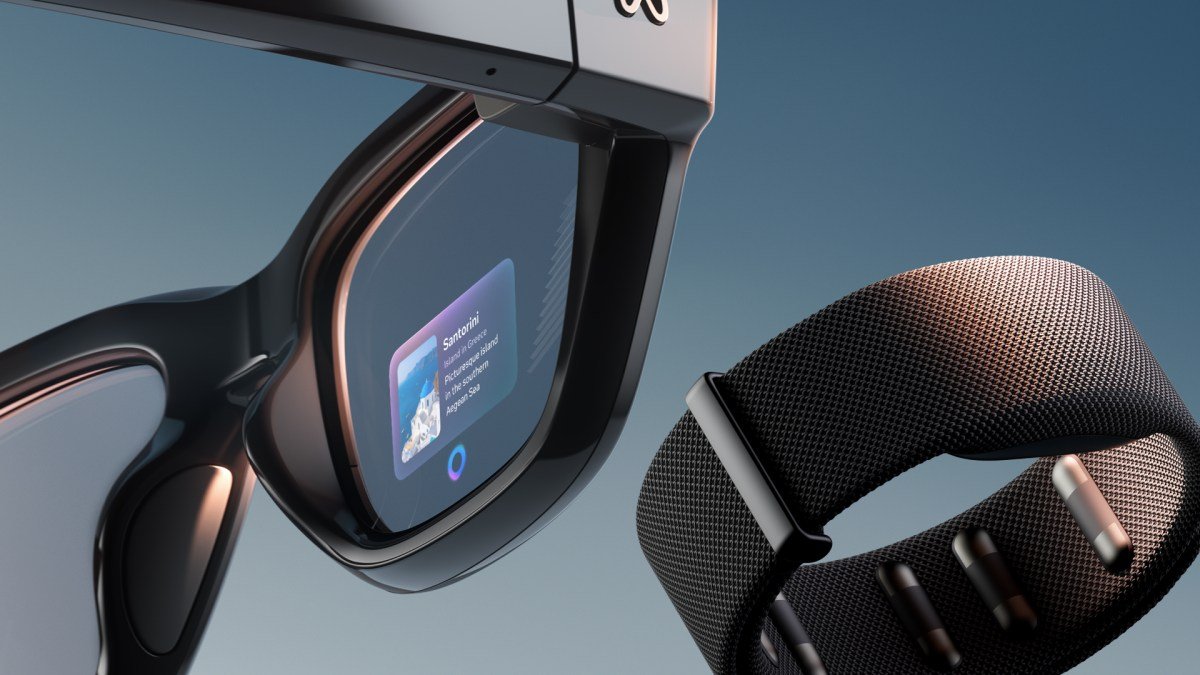
Meta Ray-Ban Display launched at $799 including the Meta Neural Band, an EMG wristband that reads muscle signals from your fingers. Meta describes “a full-color, high-resolution display”, says “The display is placed off to the side”, and adds that it is “designed for short interactions”. The use cases Meta lists are checking messages, previewing photos, translations, Meta AI answers and walking directions, with the display showing “short texts, WhatsApp messages, or Reels your friends are sharing”. Battery is “up to six hours of mixed-use” (Meta newsroom, accessed 13 September 2026). Meta’s own framing is that this is “technology that keeps you tuned in to the world around you, not distracted from it”.
That last claim is the one to test. Note also the tension inside Meta’s copy: a display meant for short, deliberate interactions, and a device designed to surface Reels and messages you did not ask for at that moment.
The eye-comfort questions
Two distinct issues come up with any screen worn on the face. Neither has been measured for this product.
The first is the vergence-accommodation conflict. When you look at a real object, your eyes converge on it and focus at the same distance. A near-eye display sits centimetres from the eye but is optically set to appear further away, so the two systems can disagree. The classic 2008 study on this is titled, plainly, “Vergence-accommodation conflicts hinder visual performance and cause visual fatigue”. That work was done on stereoscopic (two-eye) displays. How much it applies to a small single display depends on the optical design, which Meta has not published in detail, so we cannot say the conflict is present or absent in this device.
The second is specific to displays shown to one eye. A 2023 study of wearable display configurations explains: “In monocular see-through displays, the see-through background and augmented information will conflict with the background scene in the fellow eye, producing binocular rivalry as a result.” Binocular rivalry is the visual system alternating between two incompatible images; the researchers found it reduced how reliably people could see the display content, and that eye movements and binocular designs reduced the problem. That study used a VR headset to simulate the configurations rather than a commercial product, which is a limitation, but the mechanism is general. Meta describes a single in-lens display placed off to the side; if that means one eye sees it and the other does not, this is the relevant literature.
What does not exist is a trial of any display glasses worn all day by office workers with eye-strain, dry-eye or headache outcomes. The honest position is that the mechanisms for discomfort are real and documented in the lab, the exposure with this product is designed to be brief, and the sum of those two things over a working year has not been measured. Anyone with a pre-existing eye condition, or who already gets headaches from screens, should treat that gap as a reason for caution rather than reassurance.
The attention cost is better evidenced
This is where the research is clearer, because it does not depend on the specific optics. It depends on what a notification does to a working brain, and that has been studied for a decade.
In a 2015 experiment, participants performed an attention-demanding computer task while their phones received calls or texts they were told nothing about. The researchers “found that cellular phone notifications alone significantly disrupted performance on an attention-demanding task, even when participants did not directly interact with a mobile device during the task”, and that “The magnitude of observed distraction effects was comparable in magnitude to those seen when users actively used a mobile phone, either for voice calls or text messaging.” The proposed mechanism is mind-wandering: a notification “can prompt task-irrelevant thoughts”, and those thoughts, not the act of replying, are what cost you.
A display in your eyeline is a notification you cannot leave in your pocket. The whole product concept is that you glance rather than reach. If the attentional cost comes from the alert prompting thoughts about the message, glancing does not avoid that cost; it delivers the content faster.
The second relevant finding concerns how brief an interruption needs to be. In a 2014 study of people performing a sequential task, “Interruptions averaging 4.4 s long tripled the rate of sequence errors on post-interruption trials relative to baseline trials”, and interruptions averaging 2.8 seconds doubled them. Those were interruptions about as long as a step of the main task, which is roughly the length of the “quick glance” Meta describes. The errors were sequence errors, losing your place in a chain of steps, which is what most programming and analysis work consists of.
Neither study used smart glasses. That is a real limitation and we are not going to pretend otherwise. But the effects come from the notification and the switch, not from the device that carries them, and there is no obvious mechanism by which putting the same interruption closer to the eye would make it cheaper. If anything, a device that removes the friction of reaching for a phone removes the moment where you might decide not to.
How this stacks on top of your existing screens

The people most likely to buy these already spend the day in front of two or three displays. That baseline matters. The near-eye comfort research above is about the display glasses in isolation; there is no study of adding a face-worn display to eight hours of monitor work. The attention research suggests the marginal cost of one more notification channel is not zero, and that the channel’s proximity is not a mitigation.
Meta’s pitch is that the glasses let you “look up and stay present”. The evidence on notifications suggests the opposite risk: that a screen you cannot put down is a screen that interrupts more, not less. Whether the net effect is positive depends on whether you use the display for the tasks Meta lists (a translation, a direction) or as an always-on feed. The product supports both, and the second is the one the company’s business model favours.
What a careful buyer would do
Given the state of the evidence, a few positions follow. Turn off message and social notifications on the glasses and use the display for deliberate, short tasks; that is closer to the use pattern Meta describes and further from the interruption pattern the research warns about. If you get eye strain, headaches or double vision, stop and see an optometrist, because the mechanisms for monocular display discomfort are documented even if the product-specific rates are not. And do not expect a clear answer on long-term effects soon: the studies that would settle the eye question, months-long wear with clinical outcomes, have not been run.
We covered the broader research on how offloading attention to devices changes self-assessment in cognitive offloading and the AI confidence gap, and the short-form video side of the same problem in is brain rot real. For how we distinguish manufacturer claims from measured outcomes, see how we research.
Common questions
Do Meta Ray-Ban Display glasses cause eye strain?
Unknown for this product; no eye-health study of it has been published. Lab research shows near-eye displays can cause visual fatigue through vergence-accommodation conflict, and single-eye see-through displays produce binocular rivalry, where the two eyes compete. Meta says the display is off to the side and for short interactions, which limits exposure, but nobody has measured all-day use.
Are smart glasses notifications more distracting than phone notifications?
Not directly tested. But a 2015 experiment found phone notifications alone disrupted an attention task as much as active phone use, without any interaction, because they prompt task-irrelevant thoughts. A display in your eyeline delivers the content faster, which does not remove that mechanism. The safest assumption is that the attention cost is at least the same.
How short can an interruption be and still hurt your work?
Very short. In a 2014 study, interruptions averaging 2.8 seconds doubled sequence errors on a step-by-step task, and interruptions averaging 4.4 seconds tripled them. That is about the length of glancing at a message on a display. The errors were losing your place in a sequence, which is the core of most technical work.
Is there long-term research on wearing display glasses all day?
No. Meta Ray-Ban Display went on sale in September 2025, and no months-long study with eye or attention outcomes has been published. The evidence that exists comes from lab studies of near-eye and monocular displays and from notification research using phones. Anyone with existing eye problems or screen headaches should treat that absence as a reason for caution.
How much do Meta Ray-Ban Display glasses cost and what do they do?
Meta lists them from $799 including the Neural Band wristband, with up to six hours of mixed-use battery. The in-lens display shows messages, photo previews, live captions and translations, Meta AI answers and walking directions, controlled by finger movements read through the wristband. Prices and features are as stated on Meta’s newsroom on 13 September 2026 and may change.
Did this answer your question?
Thanks. That helps us decide what to fix.


Leave a comment